

TL;DR
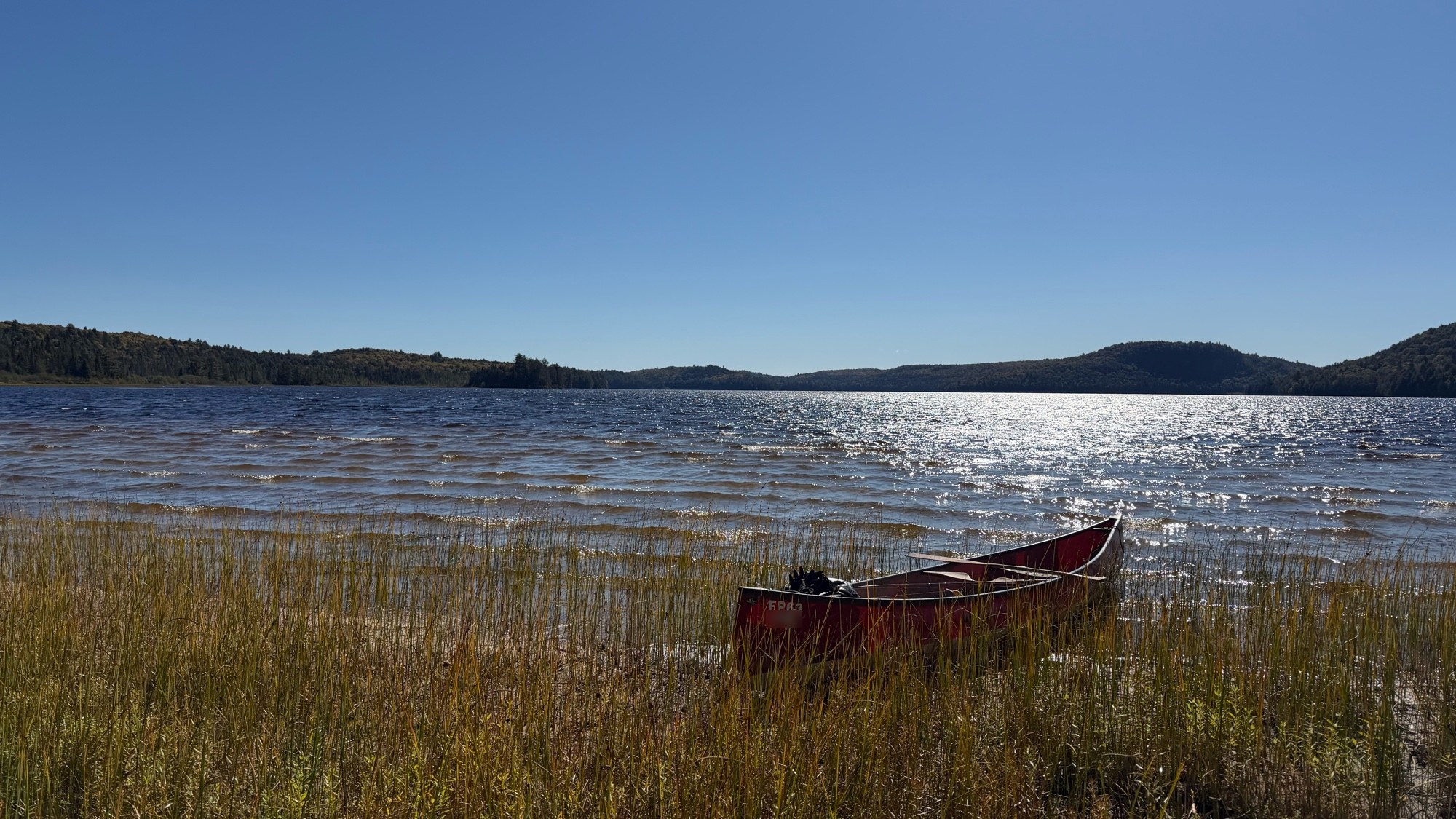
- I wanted a canoe-on-a-lake clip from my September backcountry trip as an Apple-style moving wallpaper and screensaver on the Mac Studio. macOS 27 has no “use my video” button, so Claude Code built one.
- The clip was 75 seconds of handheld 4K HLG at 120 fps. It was tone-mapped to SDR with VideoToolbox, locked to the far treeline with OpenCV ECC (correlation ≥ 0.991 on every frame) and cut into a 45-second loop with no visible seam. The tripod lock costs a 7.75% crop.
- The seam needed two fixes nobody would think of up front: a morph crossfade for foreground parallax, and
-g 600because ffmpeg’s default keyframe interval made the water pulse ten times a second. - It’s installed as a real aerial by adding an entry to the per-user manifest Apple ships, with a LaunchAgent that re-adds it if Apple refreshes the catalog. The desktop ended up as the 48 MP still taken 14 seconds earlier, and the video runs as the screensaver.
The ask
The request I typed was short: make a moving Apple background and screensaver out of “this video”. Then I attached a JPEG and a screenshot of the Photos app instead of the video. That’s on me.
The agent worked it out anyway. The screenshot showed a capture time down to the second, and the JPEG was 16:9, which iPhone photos aren’t. So it queried the Photos library for that minute:
osxphotos query --from-date 2026-09-23T11:00:00 --to-date 2026-09-23T12:00:00 --json > q.json
That turned up IMG_5326.MOV: 3840×2160, HEVC 10-bit, HLG/BT.2020, 120 fps, 75 seconds, 1.28 GB, and a favorite. It also turned up a 48 MP still taken 14 seconds earlier from the same spot, which comes back later.
The trip itself was the one from the agent-kept trip page post: a week at a cabin in a big Ontario park, and this was lunch on a windy beach.
How macOS 27 stores aerials
“Moving Apple background” means aerials: the drone shots that play as the screensaver, keep going on the lock screen and slow to a still on the desktop. Older guides say they live in /Library/Application Support/com.apple.idleassetsd/Customer/. On this Mac that folder existed and was empty.
On macOS 26 and 27 they live per user:
~/Library/Application Support/com.apple.wallpaper/aerials/
├── manifest/entries.json      # catalog: assets, categories, subcategories
├── manifest.tar               # the same entries.json, packed (re-extract source)
├── videos/<asset-id>.mov      # downloaded aerials, named by asset UUID
└── thumbnails/<id>.png        # 214×130 16-bit PNG, per asset and subcategory
entries.json had 164 assets in six categories. Each asset is a small JSON object with a UUID, a category, a localizedNameKey and a url-4K-SDR-240FPS pointing at Apple’s CDN. A probe of a downloaded one gave the target format:
$ ffprobe -v error -show_entries stream=codec_name,codec_tag_string,profile,width,height,r_frame_rate,color_transfer \
    -of compact videos/4C108785-....mov
stream|codec_name=hevc|profile=Main 10|codec_tag_string=hvc1|width=3840|height=2160|color_transfer=bt709|r_frame_rate=240/1
So: 4K, HEVC Main 10 tagged hvc1, SDR BT.709, about 12.5 Mbps, and a keyframe every 1,200 frames. The “240FPS” in the key name is literal. Apple shoots them at 240 fps so the slow-down into the desktop stays smooth.
Nothing else records “downloaded”. A grep across ~/Library found no database or plist tracking it, so a file named videos/<uuid>.mov is all the extension checks.
HLG to SDR without zscale
The usual ffmpeg recipe for HDR to SDR is zscale plus tonemap. Homebrew’s ffmpeg 9.0 build here has no zscale (no libzimg), and tonemap needs linear float input, which is the part zscale provides.
It does have scale_vt, the VideoToolbox scaler, and that one takes output color tags. Converting on the GPU handles iPhone HLG properly:
ffmpeg -hwaccel videotoolbox -hwaccel_output_format videotoolbox_vld -i IMG_5326.MOV \
  -map 0:v:0 -frames:v 1 \
  -vf "scale_vt=color_matrix=bt709:color_primaries=bt709:color_transfer=bt709,hwdownload,format=p010le,format=yuv420p" \
  frame.jpg
The same filter chain drives everything below. Decoding is VideoToolbox, conversion is VideoToolbox, and Python only ever sees 10-bit BT.709 frames.
The clip was handheld
The first contact sheet looked steady: canoe in the same spot, horizon level. The first loop-point search agreed and reported a near-perfect match between 9.0 s and 23.0 s.
Then the agent did the check that matters for a crossfade loop. The midpoint of a crossfade is literally a 50/50 blend of the two frames, so it rendered that blend at full 4K:
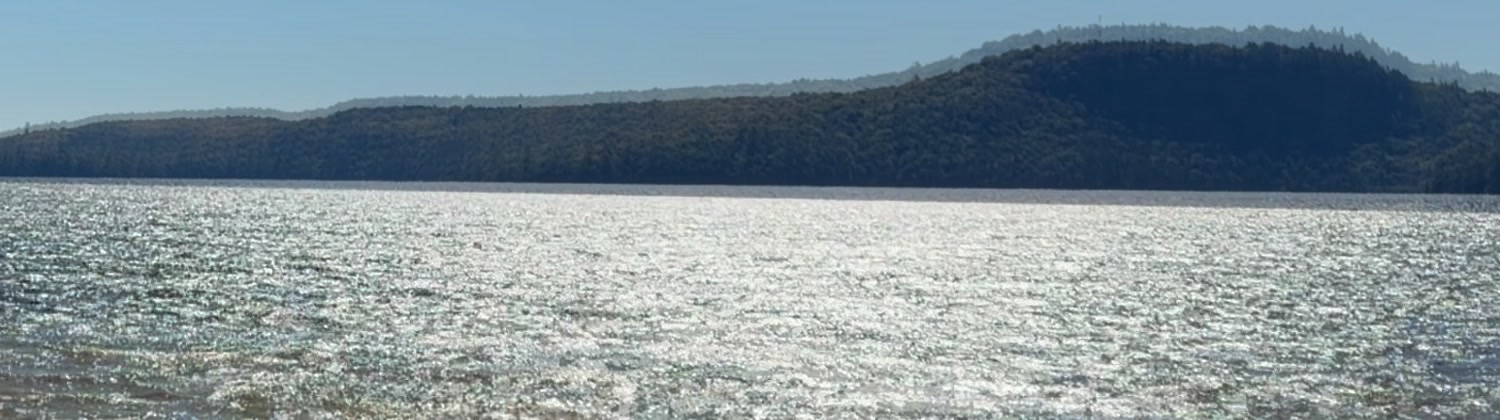
Two hills. Every candidate pair ghosted, offset by tens of pixels. The camera was drifting and rolling the whole time, just slowly enough that a contact sheet hides it.
Two trackers that lied
The 50/50 blend exposed two bad trackers in a row:
- Phase correlation on the whole frame, 192 px wide. The sun glitter on the water dominates the spectrum and changes every frame. The camera shifts it found were mostly noise, and that’s where “9.0 s matches 23.0 s” came from.
- Phase correlation, then optical-flow features, on a “treeline band”. The correlation peaks came back around 0.02, and the feature tracker kept about 40 RANSAC inliers out of 362. Both are noise. When the agent finally drew row numbers on a reference frame, the band it had picked was mostly empty sky. The treeline sat below it.
ECC on the right band
The third attempt used OpenCV’s findTransformECC, a Euclidean model (shift plus roll), on the correct band: rows 200 to 268 of a 960×540 downscale, the dark forest against bright sky. Every frame was registered against one reference, seeded with the previous frame’s result:
import cv2, numpy as np

W, H = 960, 540
frames = np.memmap("full120.gray", dtype=np.uint8, mode="r").reshape(-1, H, W)
prep = lambda f: cv2.GaussianBlur(np.ascontiguousarray(f).astype(np.float32), (0, 0), 1.0)

ref = prep(frames[2900])                       # mid-clip reference
mask = np.zeros((H, W), np.uint8)
mask[200:268, :] = 255                         # far treeline only: static, high contrast
crit = (cv2.TERM_CRITERIA_EPS | cv2.TERM_CRITERIA_COUNT, 100, 1e-6)

M = np.eye(2, 3, dtype=np.float32)
track = []
for i in range(2900, len(frames)):             # (and a second pass backwards to 0)
    cc, M = cv2.findTransformECC(ref, prep(frames[i]), M.copy(),
                                 cv2.MOTION_EUCLIDEAN, crit, mask, 5)
    track.append((M[0, 2], M[1, 2], np.degrees(np.arctan2(M[1, 0], M[0, 0])), cc))
Run at the full 120 fps over 5,800 frames (forward and backward passes in parallel, about 107 s on an M3 Ultra):
| Metric | Value |
|---|---|
| Minimum ECC correlation | 0.991 |
| Largest frame-to-frame step | 0.78 px at 4K |
| High-frequency estimator noise | ~0.06 px |
| Total drift over 75 s | ~300 px horizontal, ~180 px vertical, ±1.3° roll |
That was a real camera track. The plan became: lock every frame to the treeline as if the phone had been on a tripod, and accept a crop to hide the borders.
Picking the window
How much crop depends on how much the camera wandered inside the loop window. A brute-force search over start time and length, checking that all four warped corners stay inside the source, gave:
| Loop length | Zoom needed |
|---|---|
| 30 s | 5.5% |
| 45 s | 6.75% to 7.75% |
| 60 s | 9.5% |
| 65 s | 11% |
45 seconds from t = 0.5 s won. It’s long enough that the water never visibly repeats, and the final zoom with a safety margin is 1.0775.
Rendering the loop
The renderer is a Python pipe between two ffmpeg processes. ffmpeg decodes and tone-maps to raw 10-bit p010le, Python warps the luma and the interleaved chroma planes with cv2.warpAffine, and a second ffmpeg encodes with hevc_videotoolbox. No 8-bit step anywhere:
def warp(buf, i):
    A = A_of(i)                          # dst->src: frame pose ∘ inverse(lock pose) ∘ zoom
    Ac = A.copy(); Ac[:, 2] *= 0.5       # chroma plane is half resolution
    y  = np.frombuffer(buf, np.uint16, W * H).reshape(H, W)
    uv = np.frombuffer(buf, np.uint16, W * H // 2, W * H * 2).reshape(H // 2, W // 2, 2)
    fl = cv2.INTER_CUBIC | cv2.WARP_INVERSE_MAP
    return (cv2.warpAffine(y,  A,  (W, H),           flags=fl, borderMode=cv2.BORDER_REPLICATE),
            cv2.warpAffine(uv, Ac, (W // 2, H // 2), flags=fl, borderMode=cv2.BORDER_REPLICATE))
The loop is a rotated crossfade. Output frames are the body (s+F … s+L-1), then F frames where the tail (s+L+j) fades into the head (s+j) on a smoothstep curve. When the file wraps, the last blended frame is almost exactly s+F-1 and the next frame is s+F, so there’s nothing to see. A second decoder process supplies the head frames, so nothing gets buffered.
It renders 5,700 4K frames in about two and a half minutes. Over the full loop the treeline now moves at most 2 px, down from ±150 px, and roll is about 0.01°.
Fix 1: parallax ghosting
The first render passed every number and still had a flaw. At mid-crossfade the canoe’s rim had a faint second line:
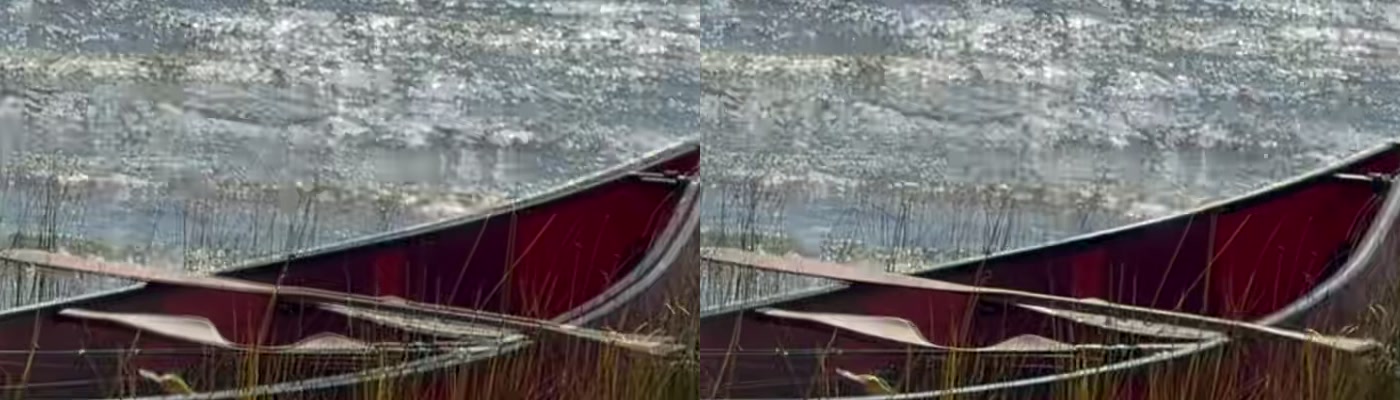
That’s parallax. The lock is exact for the far shore, but the canoe sits a few metres from the camera, so the handheld sway moves it differently. Between the loop’s last and first frames the canoe disagreed by about 8 px.
The fix is a morph crossfade. The agent measured the canoe offset d between each tail/head pair with ECC on a canoe mask, then shifted both frames toward a shared position during the fade: the tail by -w·d, the head by (1-w)·d. At w = 0 the tail is untouched, which keeps continuity with the frame before. At w = 1 the head is untouched, which keeps continuity with the frame after. In between, both canoes overlap exactly. The shift is applied only below the waterline and ramps in across the water, where a few pixels of warp are invisible:
Y0, Y1 = 1180, 1450                       # no shift above Y0 (far shore), full shift below Y1
ramp = lambda yy: np.clip((yy - Y0) / (Y1 - Y0), 0, 1).astype(np.float32)

for j in range(F):
    x = (j + 1) / (F + 1); w = x * x * (3 - 2 * x)          # smoothstep
    tail = warp_shift(read(dec1), s + L + j, -w * seam[j])  # tail glides toward head
    head = warp_shift(read(dec2), s + j, (1 - w) * seam[j]) # head starts at the tail
    write(blend(tail, head, w))
The canoe glides about 8 px over 2.5 seconds, which nobody will ever see.
Fix 2: the water was pulsing
The next check ran frame-to-frame differences across the whole output. Spikes showed up at regular intervals, nearly all of them on frames whose index was 11 mod 12, right before every twelfth frame.
$ ffprobe -v error -select_streams v:0 -show_entries frame=pict_type -of csv=p=0 loop.mov | grep -n I | head -4
1:I
13:I
25:I
37:I
ffmpeg’s default gop_size is 12, and hevc_videotoolbox honors it. That’s a keyframe every 0.1 s, and on high-entropy sun glitter each keyframe is a small quality jump. The water was breathing at 10 Hz. Apple’s own files use one keyframe per 1,200 frames, so the encoder now gets a 5-second GOP that divides the loop evenly:
ffmpeg -f rawvideo -pix_fmt p010le -s 3840x2160 -r 120 \
  -color_range tv -color_primaries bt709 -color_trc bt709 -colorspace bt709 -i pipe:0 \
  -c:v hevc_videotoolbox -profile:v main10 -b:v 50M -g 600 -prio_speed 0 -tag:v hvc1 \
  -color_range tv -color_primaries bt709 -color_trc bt709 -colorspace bt709 \
  -map_metadata -1 -movflags +faststart -an loop.mov
After that, the two seam points measured as ordinary frame changes. The source turned out to have a natural motion spike every fourth frame, and both seams land on that rhythm. The final file is 45.000 s, 5,400 frames at 120 fps, 284 MB, with no audio and no GPS. -an and -map 0:v:0 matter here: the iPhone file carries AAC and spatial audio tracks plus six data tracks, and a screensaver playing wind noise would be a bad surprise.
Here are the last six seconds and the first six seconds back to back, downscaled. The wrap is in the middle:
Installing it as a real aerial
The installer adds one asset and one Landscape subcategory, copies the video and thumbnails in, and restarts the extension:
asset = {
    "accessibilityLabel": NAME,
    "categories": ["A33A55D9-EDEA-4596-A850-6C10B54FBBB5"],   # Landscapes
    "id": ASSET_ID,
    "includeInShuffle": False,
    "localizedNameKey": NAME,       # not in Apple's strings table, so the key text is shown as-is
    "pointsOfInterest": {},
    "preferredOrder": -1000,        # first tile in the row
    "previewImage": file_url(thumb),
    "shotID": "LAKE_LOOP",
    "showInTopLevel": True,
    "subcategories": [SUBCAT_ID],
    "url-4K-SDR-240FPS": file_url(master_mov),
}
Three details made it stick:
- Patch both copies of the manifest.
entries.jsonis also packed inmanifest.tar. The installer rewrites the tar member too, keeping its format, mode and mtime, so a re-extract doesn’t drop the entry. - The display name. Names come from a signed
.loctablein a strings bundle. Editing it would break the signature, but a key missing from the table renders as the key itself. So the key is the name I wanted. - A guard for catalog refreshes. Apple re-downloads the manifest after OS updates. A LaunchAgent watches both files and reruns the idempotent installer:
<key>WatchPaths</key>
<array>
  <string>~/Library/Application Support/com.apple.wallpaper/aerials/manifest.tar</string>
  <string>~/Library/Application Support/com.apple.wallpaper/aerials/manifest/entries.json</string>
</array>
<key>RunAtLoad</key><true/>
<key>ThrottleInterval</key><integer>30</integer>
(launchd wants absolute paths there; I shortened them for the post.) Apple’s original entries.json and manifest.tar are backed up next to the installer, and --uninstall reverses everything.
After killall WallpaperAerialsExtension WallpaperAgent, System Settings → Wallpaper showed the new tile first in the Landscape row, with a play badge instead of a download badge. That meant it counted as downloaded.
Selecting it was its own small adventure
This part was supposed to take one click.
- Accessibility clicks do nothing on wallpaper tiles.
click button 1 of …through System Events (AXPress) ran without error and changed nothing. The computer-use tool’s click didn’t stick either. - A real mouse event does work. The agent read the tile’s frame from the accessibility tree and posted a synthetic click at its center with a ten-line Swift helper (below). In the Screen Saver sheet the tile was clipped below a scroll area, so it also needed a synthetic scroll first.
- Screenshots can lie about wallpaper. After selection, the computer-use screenshots still showed the old gradient desktop and a blank preview box. The wallpaper and the preview are drawn by an extension process the tool filters out. A native
screencaptureshowed the lake. - In zsh,
logis a builtin. For a while everylog showquery came back empty, which looked like the extension wasn’t logging anything. The zsh builtin was swallowing the arguments./usr/bin/log showthen showed the agent asking the aerials extensionisChoiceDownloaded, opening a hardware HEVC decoder, and the renderer switching to “Rendering with success”.
import CoreGraphics
import Foundation
let p = CGPoint(x: Double(CommandLine.arguments[1])!, y: Double(CommandLine.arguments[2])!)
let src = CGEventSource(stateID: .hidSystemState)
CGEvent(mouseEventSource: src, mouseType: .mouseMoved, mouseCursorPosition: p, mouseButton: .left)?.post(tap: .cghidEventTap)
usleep(150_000)
CGEvent(mouseEventSource: src, mouseType: .leftMouseDown, mouseCursorPosition: p, mouseButton: .left)?.post(tap: .cghidEventTap)
usleep(80_000)
CGEvent(mouseEventSource: src, mouseType: .leftMouseUp, mouseCursorPosition: p, mouseButton: .left)?.post(tap: .cghidEventTap)
The ground truth for “did the selection take” is ~/Library/Application Support/com.apple.wallpaper/Store/Index.plist. Its Desktop and Idle entries hold a com.apple.wallpaper.choice.aerials provider with {"assetID": …} in the encoded configuration. I’d only read that file to verify, never hand-edit it.
Still for the desktop, video for the screensaver
With the aerial working as the desktop, I noticed the problem with the plan. An aerial on the desktop is just a paused video frame, a 4K frame from a compressed stream. There was a 48 MP photo taken 14 seconds earlier from the same spot.
So the split changed:
- Desktop: the 5712×4284 still, cropped to 16:9 (5712×3213, Display P3). That’s about 2.2× the pixels of a 4K frame, and it’s a proper photo rather than a video frame. It’s set with “Show on all Spaces”.
- Screensaver: the loop, picked in Wallpaper → Screen Saver… with “Use Screen Saver” set to Custom, so changing the wallpaper later leaves it alone.
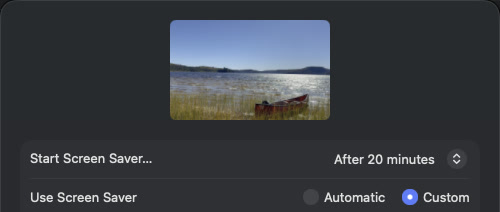
The catch: you lose Apple’s effect where the screensaver slows down into the desktop, because that only happens when both are the same aerial. A sharp desktop is worth more to me than the transition.
Results
| Source | 75 s, 3840×2160, HEVC 10-bit HLG, 120 fps, 1.28 GB |
| Output | 45.000 s loop, 5,400 frames, HEVC Main 10 hvc1, BT.709 SDR, 50 Mbps, 284 MB |
| Stabilization | treeline residual ≤ 2 px, roll ≈ 0.01°, 7.75% crop |
| Seam | frame change at the wrap within normal frame-to-frame variation; no ghost at mid-fade |
| Playback | settings preview decoding 720 frames per 6 s (full 120 fps), 0 dropped |
| Render time | about 2.5 min for 5,700 frames on an M3 Ultra |
One check I deliberately skipped: test-launching the screensaver. This Mac locks the screen the moment the screensaver starts, and making me type my password to prove a point is not a test, it’s an interruption. The live preview at full frame rate was enough evidence.
Lessons learned
- Judge a crossfade loop by its midpoint. A 50/50 blend of the two seam frames shows the ghost directly. Contact sheets and “best match” scores both missed it.
- Check what your tracker is looking at. Two wrong trackers produced confident-looking numbers. Drawing row numbers on one reference frame fixed the second mistake in a minute.
- Locking the far plane doesn’t lock the near one. With handheld footage, anything close to the camera has its own parallax. A morph crossfade fixes it at the seam without a full depth-aware warp.
- ffmpeg’s
-g 12default is a trap with VideoToolbox. Ten keyframes a second makes high-detail textures pulse. Set-gon purpose. - On macOS UI automation, trust the store file and a real screenshot. AXPress can silently no-op, screenshot tools can filter out extension-drawn content, and
login zsh isn’t thelogyou want. - The best desktop picture might not be in the video at all. The phone took a 48 MP photo of the same scene 14 seconds before I hit record.