

TL;DR
I spent a full day trying to automatically generate professional architecture diagrams for a 7-node k3s homelab. Figma’s MCP integration was perfect but requires a paid subscription. I tried Excalidraw (JSON generation + Kroki rendering), Mermaid, and finally landed on raw SVG generation in Python. The result is 27 diagrams with tech icons, drop shadows, and curved arrows — but the process is more manual than I’d like. I’m curious if anyone else has found a truly automated, free solution.
The problem
I run a homelab k3s cluster that’s grown to 50+ namespaces, 7 nodes, and a pile of services. The documentation lives on a self-hosted Wiki.js instance, and it was full of hand-drawn diagrams from a Figma session that were about to expire. I needed:
- Architecture diagrams that look professional enough to show clients
- Diagrams that stay accurate as the cluster changes
- A free solution (no Figma Pro, no Lucidchart, no paid SaaS)
- Something an AI agent can generate programmatically
That last point matters — I use Claude Code extensively, and I wanted diagrams I could regenerate by running a script, not by clicking around a GUI.
Strategy 1: Figma MCP (the gold standard I can’t afford)
Let me be upfront: Figma with the MCP integration works perfectly. Claude can generate FigJam diagrams through the Figma MCP server, and they look incredible — proper AWS-style layout, interactive zoom, real-time collaboration. I generated 15 architecture diagrams in one session.
The problem: they expire after 7 days on the free tier. And Figma Pro is $15/month per editor, which feels wrong for a homelab documentation project that I update maybe twice a month.
If you have a Figma subscription already, stop reading. Use the Figma MCP. It’s the answer.
Strategy 2: Self-hosted Excalidraw + Kroki rendering
My second attempt was to self-host Excalidraw on k3s and generate .excalidraw JSON files programmatically.
The deployment was easy — Excalidraw is a static React app, one container, no database:
image: excalidraw/excalidraw:latest
ports:
  - containerPort: 80
Traefik ingress, cert-manager TLS, done in 10 minutes.
The JSON generation was harder. Excalidraw’s file format requires specific field combinations for text-to-container binding:
{
  "type": "rectangle",
  "boundElements": [{"type": "text", "id": "text-1"}],
  ...
}
I wrote a Python generator that creates nodes, arrows, and group boxes. It produces valid JSON that Excalidraw can open. But here’s the catch: rendering the JSON to images is a pain.
Excalidraw has no CLI export. I tried:
- excalidraw-brute-export-cli — uses Playwright to automate the Excalidraw UI. Broke on the file chooser dialog.
- excalirender — Linux-only binary, wouldn’t run on macOS.
- Puppeteer screenshot — loaded the files via localStorage injection, but the text didn’t render (font loading race condition).
Kroki solved the rendering. I deployed Kroki on k3s (gateway + excalidraw sidecar + mermaid sidecar), and it renders .excalidraw files to SVG via a simple POST:
curl -X POST https://kroki.internal/excalidraw/svg \
  -H "Content-Type: text/plain" \
  -d @diagram.excalidraw \
  -o output.svg
The result was… okay. The Excalidraw hand-drawn aesthetic doesn’t scream “professional.” Text overlapped arrows, elements were cramped, and the wobbly lines looked casual rather than polished.
Strategy 3: Mermaid (built into Wiki.js)
Wiki.js renders Mermaid natively, so I tried using Mermaid code blocks directly:
flowchart LR
    DEV["git push"] --> ARC["ARC Runner"] --> BUILD["Docker Build"]
    BUILD --> STAGE["Harbor Staging"] --> SCAN["Trivy Scan"]
Pros:
- Zero infrastructure needed
- Version-controlled (it’s just markdown)
- Wiki.js renders it automatically
Cons:
- No control over layout — Mermaid’s auto-layout algorithm makes its own decisions about where nodes go
- Text overlap on complex diagrams — 20+ nodes and it becomes unreadable
- Can’t add icons — no way to embed technology logos
- Looks like a developer tool, not a presentation — fine for internal docs, not for showing clients
I ended up with 53 Mermaid blocks across my wiki. They conveyed information but didn’t look good.
Strategy 4: Raw SVG generation (what actually shipped)
After three failed strategies, I went back to basics: generate SVG files directly in Python.
No Excalidraw. No Kroki. No Mermaid. Just XML string concatenation with math for arrow routing.
class SVG:
    def node(self, x, y, w, h, label, fill, stroke, ...):
        """Rounded rect with drop shadow + centered text."""
        self.rect(x, y, w, h, fill, stroke, rx=8)
        # Center text vertically within the box
        ...

    def arrow(self, x1, y1, x2, y2, color):
        """Smart arrow: straight when aligned, curved when diagonal."""
        angle = abs(math.degrees(math.atan2(...)))
        if angle < 15 or angle > 75:
            # Straight line
        else:
            # Quadratic bezier curve
I added:
- Technology icons from Simple Icons (MIT licensed, 24x24 SVG paths for Kubernetes, Docker, Prometheus, Grafana, etc.)
- Drop shadows via SVG filters
- Gradient backgrounds (GitHub dark theme)
- 4K output (3840px wide, vector-scalable)
- Smart arrow routing — straight for horizontal/vertical connections, curved for diagonal
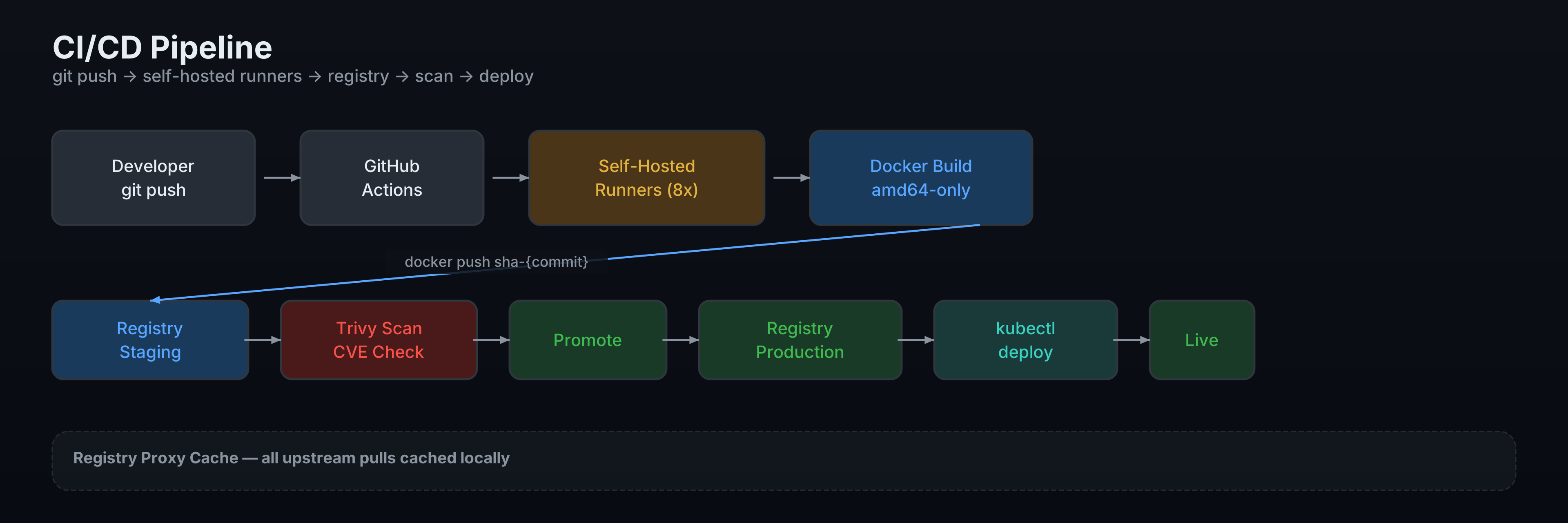
The result is something I’m actually willing to show people:
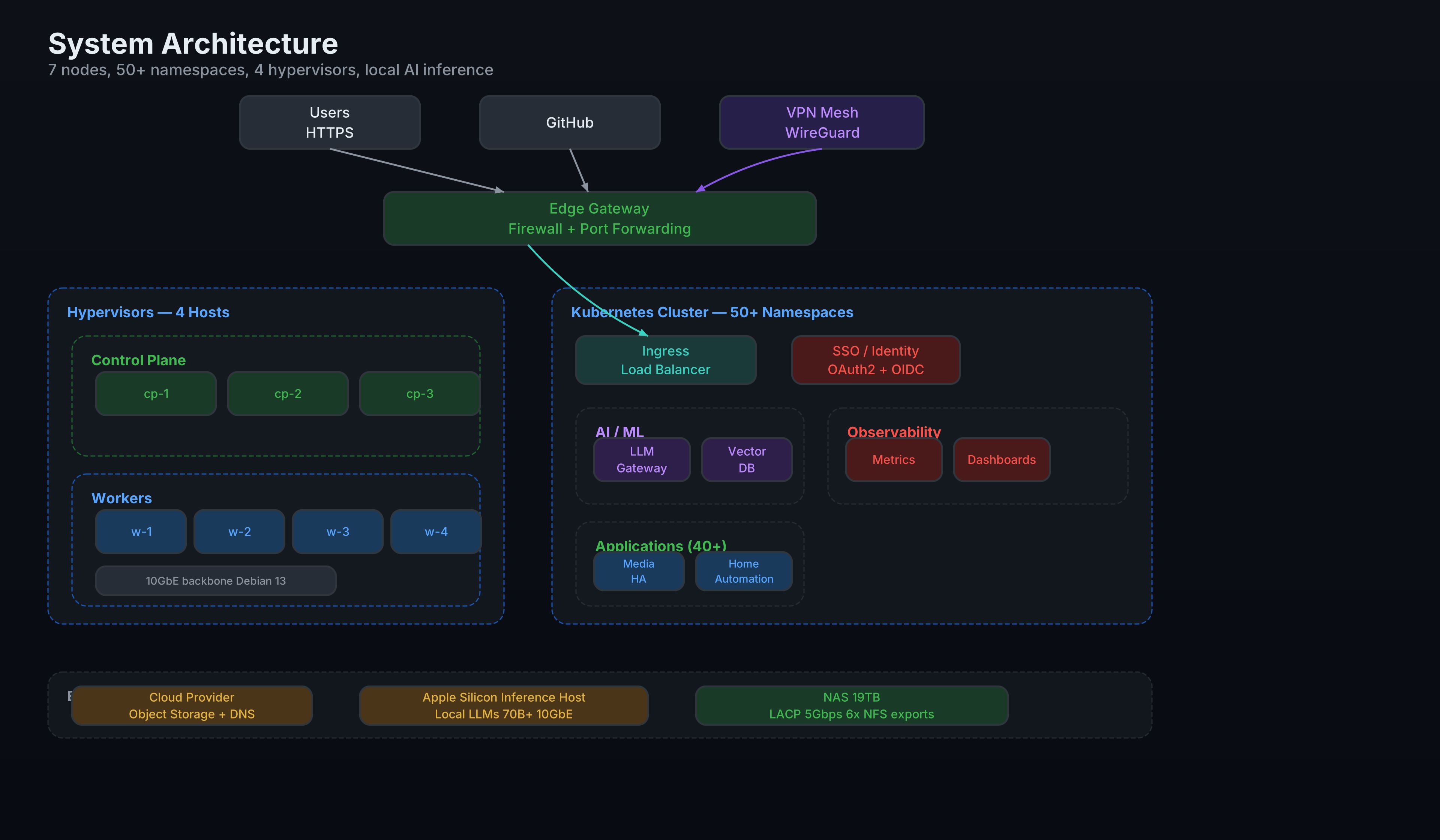
The pipeline
The final workflow is:
# 1. Edit the Python generator (docs/diagrams/generate_svg.py)
# 2. Run it
python3 docs/diagrams/generate_svg.py

# 3. Upload to Wiki.js via REST API
for f in docs/diagrams/svg/*.svg; do
  curl -X POST https://wiki.internal/u \
    -H "Authorization: Bearer $TOKEN" \
    -F "mediaUpload=@$f;type=image/svg+xml" \
    -F 'mediaUpload={"folderId":1};type=application/json'
done
The wiki pages reference the SVGs as images:

When infrastructure changes, I update the generator and re-run. 27 diagrams regenerate in under a second. The upload takes about 15 seconds.
What I wish existed
Here’s my wishlist for a tool that doesn’t seem to exist:
- Free and self-hostable (not Figma, Lucidchart, or Miro)
- Programmatic API — generate diagrams from code, not a GUI
- Professional output — drop shadows, icons, clean fonts. Not hand-drawn squiggles
- Layout engine — I don’t want to manually position every node at
(x=380, y=240). I want to say “these 5 nodes are in a group, connect them to that node” and have the tool figure out the coordinates - Kubernetes-aware — bonus points if it can read
kubectl getoutput and generate diagrams automatically
The closest I’ve found:
- Figma MCP — hits 2, 3, 4 but fails 1
- Mermaid — hits 1, 2, 4 but fails 3
- D2 (Terrastruct) — hits 1, 2, 4 but the output style is mid
- Graphviz — hits 1, 2, 4 but looks like it’s from 2003
- Excalidraw — hits 1 but fails 2, 3, 4
My raw SVG approach hits 1, 2, 3 but completely fails 4. Every node is manually positioned. It’s tedious but the output looks right.
The numbers
| Metric | Value |
|---|---|
| Total diagrams generated | 27 |
| Wiki pages updated | 18 |
| Old Mermaid blocks replaced | 36 |
| Expired FigJam links removed | 9 |
| Lines of Python (generator) | ~1,200 |
| Technology icons embedded | 30+ |
| Time to regenerate all 27 | < 1 second |
| Time to upload to Wiki.js | ~15 seconds |
| Time to build the whole system | ~8 hours |
Has anyone solved this?
I’m genuinely curious: has anyone found a free, self-hostable tool that generates professional architecture diagrams programmatically with a layout engine?
The Excalidraw MCP (yctimlin/mcp_excalidraw) looked promising but requires running a canvas container and the output still has the hand-drawn aesthetic. D2’s layout engine is interesting but the visual style isn’t there yet.
I considered training a LoRA on architecture diagram images and using ComfyUI to “pretty up” the raw SVGs, but diffusion models can’t preserve text labels — you’d get beautiful blurry nonsense where the IP addresses should be.
For now, the 1,200-line Python SVG generator works. It’s not elegant, but the output is. If you’ve found something better, I’d love to hear about it.
What’s next
I’m considering:
- Auto-generating the Python from
kubectloutput — have Claude read the cluster state and produce the generator code - A GitHub Action that regenerates diagrams on infrastructure PRs
- Investigating D2 more seriously now that they’ve added dark themes
The dream is kubectl get all --all-namespaces | diagram-tool > architecture.svg. We’re not there yet.